A free Bruisers 2D Boxing demo has been on Steam since January 2026, Windows only. What it covers, how it differs from launch, and what to test.
Bruisers 2D Boxing Demo: What the Free Trial Covers
Short answer: yes, there is a free demo. It has its own Steam listing, it went live on 24 January 2026, and it is Windows only — no Mac build, no Linux build. It is a separate download from the full game, it is free, and it links back to the paid release that entered Early Access on 21 October 2026.
The awkward part is the timing. The demo predates the launch build by roughly nine months, so what you play in the trial is not the same code the reviews are describing.
Free demo, Windows only, released 24 January 2026, separate Steam app from the $19.99 Early Access game. Source: Bruisers 2D Boxing demo on Steam
The facts, without the guesswork
| Question | Answer |
|---|---|
| Is there a demo? | Yes, a separate free Steam app |
| Price | Free |
| Platforms | Windows only |
| Released | 24 January 2026 |
| Full game price | $19.99 |
| Full game launch | 21 October 2026, Early Access |
| Mac demo | No |
| Progress carries to the full game | Not stated officially |
That last row is the one people ask about most and the one nobody can answer from the store page. If carrying a save matters to you, assume it does not until the developer says otherwise.
How to install it
Open the demo's Steam page, click the download button, and Steam treats it as its own library entry. It does not need the full game installed, and it does not overwrite a full-game save because it is a different app ID.
One practical note: the demo sits in your library next to the full game and the icons look similar. If you own both, check the app name before you launch, or you will spend twenty minutes wondering why your career is missing.
What the demo shows you
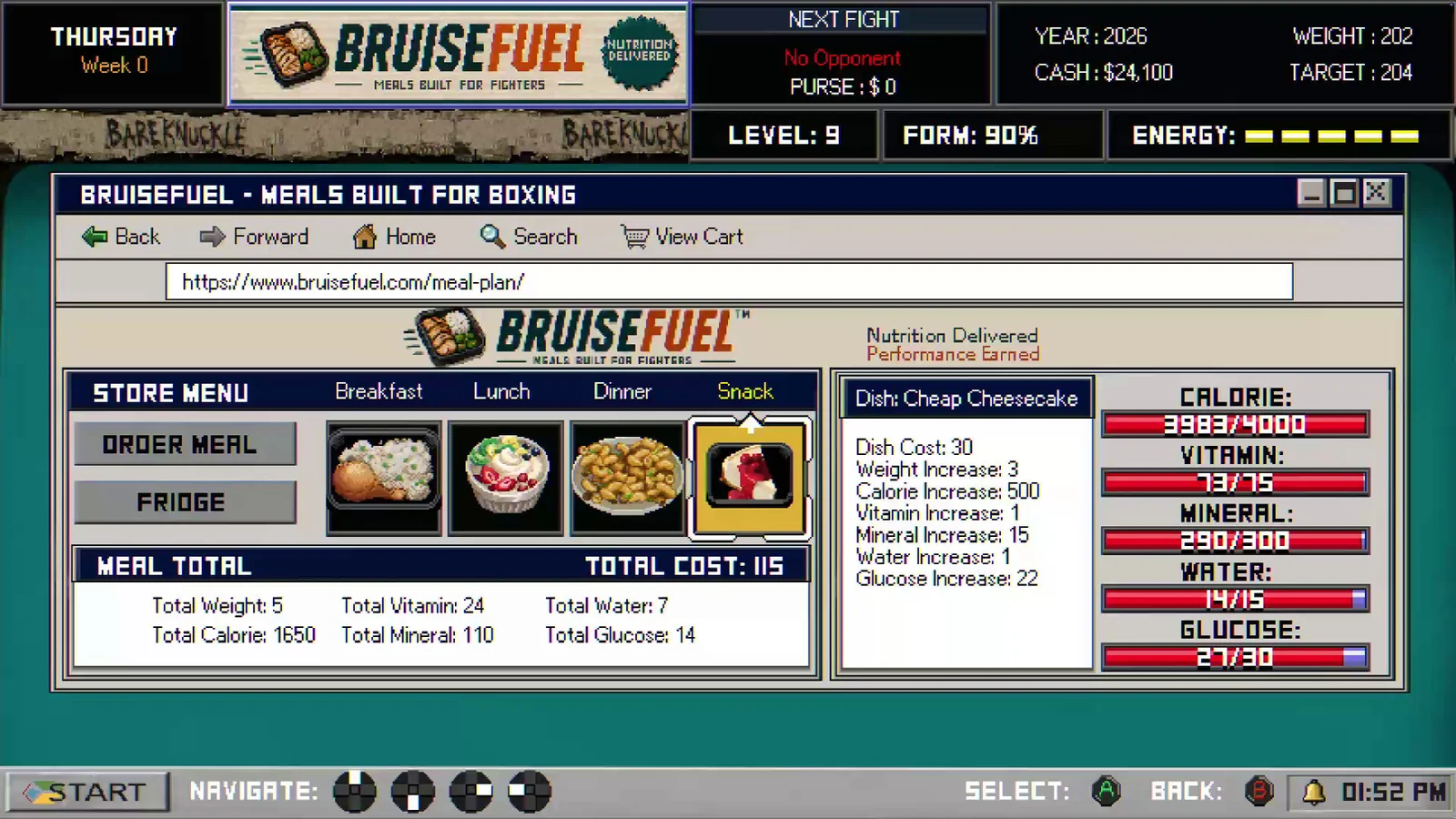
The honest answer is that the demo's contents are not documented in a changelog, and the store page does not enumerate a cut-off point. What can be said with certainty is what the full game contains, so you know what you are evaluating against:
- Career mode from amateur bouts up through the pro ranks, with training, meals, weight cuts, injuries, jobs and vitals.
- Three boxing styles — Slick, Bully and Balanced — with different strengths and a stance that shifts to in-fighting at close range.
- Quick play with a roster of 100+ fighters for local head-to-head.
- The bareknuckle circuit, the dark net, and a mob layer that sits under the career.
- Real-time aging, so a long career physically wears your fighter down.
If the demo is the January build, some of that was still in flux. Career mode in particular was described by the developer as roughly 70% finished during Early Access, which tells you the January version was earlier still.
What to actually test before you spend $19.99
A demo is only useful if you probe the parts you are unsure about. Four things worth checking:
- The punch and defense feel. Jabs, straights, hooks, uppercuts, overhands, plus slipping and parrying. If the timing does not click in the trial, it will not click later — this is the core loop.
- The between-fight management. Training, meals, sleep, jobs. Some players love the spreadsheet; some bounce off it in ten minutes. The beginner tips page is worth skimming before you start so you do not waste the trial on a bad first camp.
- The controller. The store page recommends one for a reason. If you only have a keyboard, test whether the mapping suits you before buying.
- Legibility on your screen. Career mode is text-heavy: records, rankings, vitals. Small laptops are where people complain.
What you cannot test is the long arc — aging, retirement, rivalries that develop over seasons. Those need dozens of hours, and the demo will not show them. The review page covers that side, and the price page covers whether $19.99 is the right entry point for an unfinished build.
Is the demo still worth downloading after launch?
Yes, with a caveat. It is the cheapest way to check whether the fight system suits your hands, and it costs nothing but disk space — the full game installs at about 1 GB, so the demo is smaller still. The caveat is that the live game has moved on: two hotfixes landed in the first 48 hours after launch, including a fix for a judge scoring the wrong fighter, and none of that is in a January build.
So use the demo as a feel test, not as a verdict on the current game. If the combat feels right in the trial, the launch build is the same combat with fewer bugs. If it feels wrong, no patch is going to redesign the punch system for you. The full game's store page is the place to check the current patch list, and Steam's Early Access policy explains what the developer has committed to.
If you are on a Mac
There is no Mac demo. The full game does ship a macOS build — macOS 11 Big Sur, Intel Core i5 or Apple Silicon M1 — but the trial does not. Mac players have to decide from footage and reviews. The system requirements page has the Mac spec sheet if you are checking whether your machine qualifies.
Bottom line
The demo is real, free and Windows only, and it is the only no-cost way to test the fight system. Treat it as a nine-month-old slice: good for feel, useless for judging the current patch state, and silent on whether your progress transfers.
FAQ
Is the Bruisers 2D Boxing demo free? Yes. It is a separate free Steam app with its own listing.
Does the demo work on Mac? No. It is Windows only, even though the full game ships a macOS build.
Does demo progress carry over to the full game? The developer has not stated this officially. Assume it does not.
Is the demo the same version as the Early Access release? No. The demo went up on 24 January 2026, roughly nine months before the 21 October 2026 launch, and no updated demo build is documented.
Can I play the demo without buying the game? Yes. It installs as its own library entry and does not require the paid release.
More Bruisers 2D Boxing Guides
Bruisers 2D Boxing is Steam Deck Verified. What Valve's four checks actually confirmed, the external-controller caveat, and how to set the game up on Deck.
The official Bruisers 2D Boxing system requirements for Windows and Mac, what the 1 GB VRAM floor means, and how to keep a low-end laptop playable.
Who the trainer is in Bruisers 2D Boxing, why there is no coach to hire or pay, what actually improves your fighter, and what a cheat trainer really does.
How the clinch works in Bruisers 2D Boxing: tie-ups, clinch punching, referee breaks, headbutt disqualifications and the in-fighting stance.
Whether Bruisers 2D Boxing is coming to PS5, Xbox or Nintendo Switch, what the store page says, and how likely a console port really is.
How the controls work in Bruisers 2D Boxing: moving, punching high and low, slipping, parrying, clinching and the corner mini-game inputs.
A guide to the between-round corner in Bruisers 2D Boxing: swelling drain, cut repair, tool switching, pressure and how to stop a fight being stopped on you.
How the Darknet works in Bruisers 2D Boxing: buying dope, gear and services off the books, what it costs, and how the risk lands on your fighter.